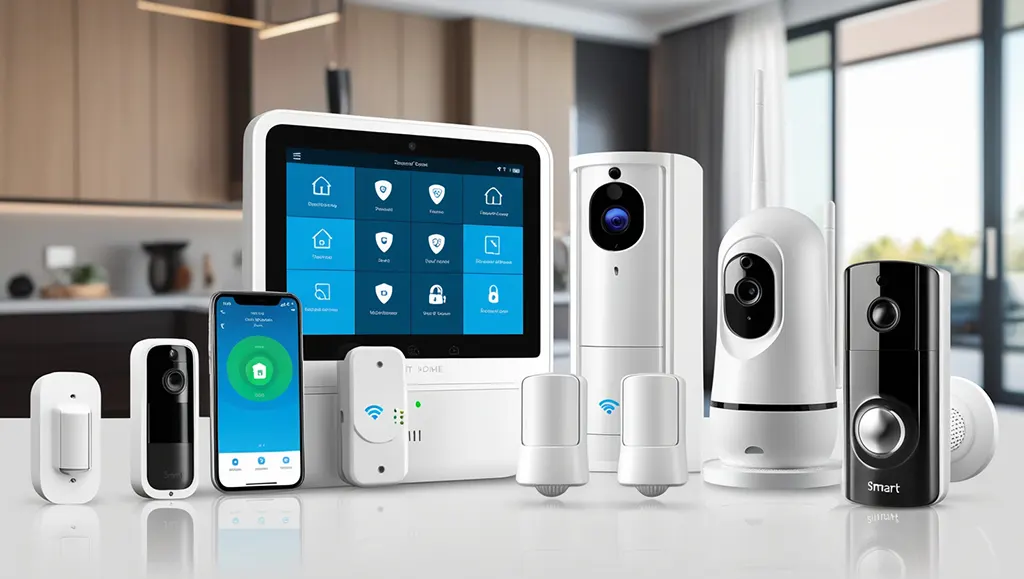
Learn how to set up a smart home security system step-by-step. Protect your home with cutting-edge technology and gain peace of mind today. In today’s world, ensuring the safety of our homes and loved ones is paramount. With advancements in technology, setting up a smart home security system has become an increasingly popular and effective way to protect our properties. This comprehensive guide will walk you through the process of how to set up a smart home security system, from choosing the right components to installation and optimization. By the end of this article, you’ll have all the knowledge you need to create a secure, interconnected home that provides peace of mind and cutting-edge protection. Understanding Smart Home Security Systems Before diving into the setup process, it’s essential to understand what a smart home security system entails. A smart home security system is a network of interconnected devices that work together to monitor and protect your home. These systems typically include a combination of sensors, cameras, alarms, and smart devices that can be controlled and monitored remotely through a smartphone app or web interface. When learning how to set up a smart home security system, it’s crucial to recognize the benefits these systems offer over traditional security setups. Smart systems provide real-time alerts, remote monitoring, and integration with other smart home devices, creating a comprehensive and responsive security solution. Key Components of a Smart Home Security System To effectively set up a smart home security system, you need to be familiar with its core components. These typically include: 1. Control Panel or Hub: The central brain of your system 2. Door and Window Sensors: Detect unauthorized entry 3. Motion Detectors: Identify movement within your home 4. Security Cameras: Provide visual monitoring and recording 5. Smart Doorbell: Allows you to see and communicate with visitors 6. Smart Locks: Enable keyless entry and remote locking/unlocking 7. Environmental Sensors: Detect smoke, carbon monoxide, or water leaks 8. Sirens or Alarms: Alert you and deter intruders 9. Smart Lights: Can be programmed to deter burglars Understanding these components is crucial when learning how to set up a smart home security system, as it will help you choose the right devices for your specific needs. Assessing Your Home Security Needs Before you begin the process of how to set up a smart home security system, it’s essential to assess your specific security needs. Every home is unique, and what works for one property may not be suitable for another. Take the time to evaluate your home’s layout, potential vulnerabilities, and your personal security concerns. Start by conducting a thorough walkthrough of your property, both inside and outside. Look for potential entry points that an intruder might target, such as ground-floor windows, sliding glass doors, or poorly lit areas around your home. Consider the following factors: – Size of your home – Number of entry points – Outdoor areas that need monitoring – Valuable items or areas that require extra protection – Presence of pets or children – Your neighborhood’s crime rate By carefully assessing these factors, you’ll be better equipped to choose the right components and design an effective system when learning how to set up a smart home security system. Creating a Security Plan Once you’ve assessed your needs, the next step in learning how to set up a smart home security system is to create a comprehensive security plan. This plan should outline: 1. Priority areas for protection 2. Types of sensors and devices needed 3. Camera placement for optimal coverage 4. Integration with existing smart home devices 5. Budget considerations 6. Monitoring preferences (self-monitoring vs. professional monitoring) Having a well-thought-out plan will streamline the setup process and ensure that you don’t overlook any critical aspects of your home’s security. Choosing the Right Smart Home Security System With a clear understanding of your needs and a solid plan in place, it’s time to choose the right smart home security system. This decision is crucial in the process of how to set up a smart home security system, as it will determine the effectiveness and ease of use of your entire setup. When selecting a system, consider the following factors: 1. Compatibility with other smart home devices 2. Ease of installation and use 3. Expandability for future upgrades 4. Quality and reliability of components 5. Customer support and warranty options 6. Cost of equipment and ongoing monitoring fees There are several reputable brands in the market, each offering unique features and benefits. Some popular options include: – Ring Alarm – SimpliSafe – Nest Secure – ADT Pulse – Abode Research each option thoroughly, read customer reviews, and compare features to find the system that best fits your needs and budget. DIY vs. Professional Installation As you learn how to set up a smart home security system, you’ll need to decide between a do-it-yourself (DIY) installation or professional installation. Both options have their pros and cons: DIY Installation: – Pros: Lower cost, flexibility in timing, sense of accomplishment – Cons: Requires technical know-how, potential for mistakes, time-consuming Professional Installation: – Pros: Expert setup, guaranteed proper functioning, time-saving – Cons: Higher cost, reliance on technician’s schedule Consider your technical skills, available time, and budget when making this decision. Many modern smart home security systems are designed for easy DIY installation, but if you’re not confident in your abilities, professional installation might be the better choice. How to Set Up a Smart Home Security System Now that you’ve chosen your system, it’s time to dive into the actual setup process. This step-by-step guide will walk you through how to set up a smart home security system, ensuring that you cover all the essential aspects of installation and configuration. Step 1: Unbox and Inventory Your Components Begin by unpacking all the components of your smart home security system. Take inventory to ensure you have all the necessary parts, including: – Control panel or hub – Sensors – Cameras – Mounting hardware – Power adapters – User manuals